Pricing products blindly is the fastest way to lose money in manufacturing. Vercos ERP provides a dynamic Wholesale Matrix & Catalog Margins module to ensure you are actually profitable across every sales channel.
How COGS is Calculated
Before evaluating margins, Vercos determines your exact costs. When you build a Product Recipe, Vercos looks at the exact quantity of each raw material required and multiplies it by the current Unit Cost of that material in your inventory.
Total COGS = (Material A Cost) + (Material B Cost) + (Labor Cost) + (Packaging Cost)
Important: If the cost of your raw materials goes up from your supplier, Vercos instantly recalculates the real-time COGS for EVERY product in your catalog.
Where "Unit Cost" comes from: your Costing Method
What counts as a material's current Unit Cost depends on the Inventory Costing Method set in your workspace (Settings → Inventory Costing Method):
- Weighted Average (default): one blended cost per material. A restock at a different price folds into the average, so Unit Cost moves gradually.
- FIFO: Unit Cost is whatever your oldest remaining batch of that material cost — it won't reflect a pricier restock until the older, cheaper stock is fully used up.
- LIFO: Unit Cost is whatever your newest batch cost — a restock changes it immediately, even if older, cheaper stock is still sitting in the warehouse.
When a Production Job actually consumes material under FIFO or LIFO, Vercos records the real cost of the specific lot(s) that job drew from — not just a flat estimate — so your historical COGS per job stays accurate even as prices change over time.
The Pricing Guidance Module
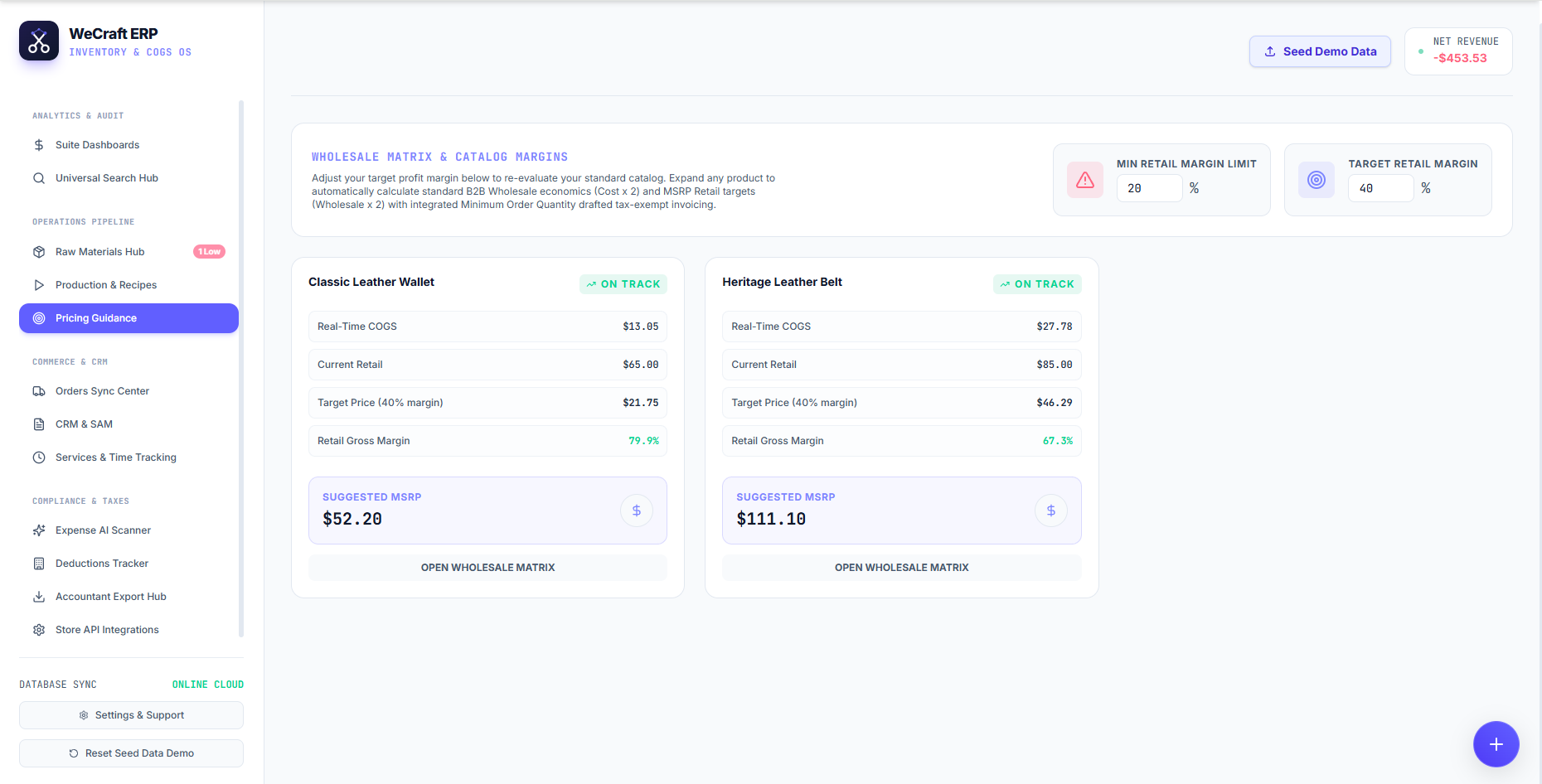
Navigate to Pricing Guidance in the left sidebar to access your Wholesale Matrix. Here, you can strategically adjust your profit models.
At the top of the dashboard, you can define your global targets:
- Target Retail Margin: Set your ideal profit percentage (e.g., 40%).
- Min Retail Margin Limit: Set your absolute floor (e.g., 20%) to trigger warnings if a product falls below acceptable profitability.
Analyzing Product Margins
For each product in your catalog (e.g., "Classic Leather Wallet"), the system generates a detailed economic card displaying:
- Real-Time COGS: The exact current cost to manufacture the item.
- Current Retail: The price you are currently selling it for.
- Target Price: The price you should sell it for to hit your Target Retail Margin.
- Retail Gross Margin: Your actual current profit percentage. If this is healthy, you will see a green ON TRACK badge.
Suggested MSRP and B2B Wholesale
Vercos ERP automatically calculates standard B2B Wholesale economics (Cost x 2) and MSRP Retail targets (Wholesale x 2). You will see the Suggested MSRP prominently highlighted on every card.
To dive deeper into wholesale pricing tiers or to draft tax-exempt B2B invoices with integrated Minimum Order Quantities (MOQs), simply click the Open Wholesale Matrix button on any product.