A Product Recipe (also known as a Bill of Materials or BOM) is the heart of Vercos ERP. It tells the system exactly which raw materials are required to build one unit of a finished product.
However, Vercos goes beyond simple material tracking by integrating intelligent pricing models directly into your recipe definitions.
The Pricing & Recipes Dashboard
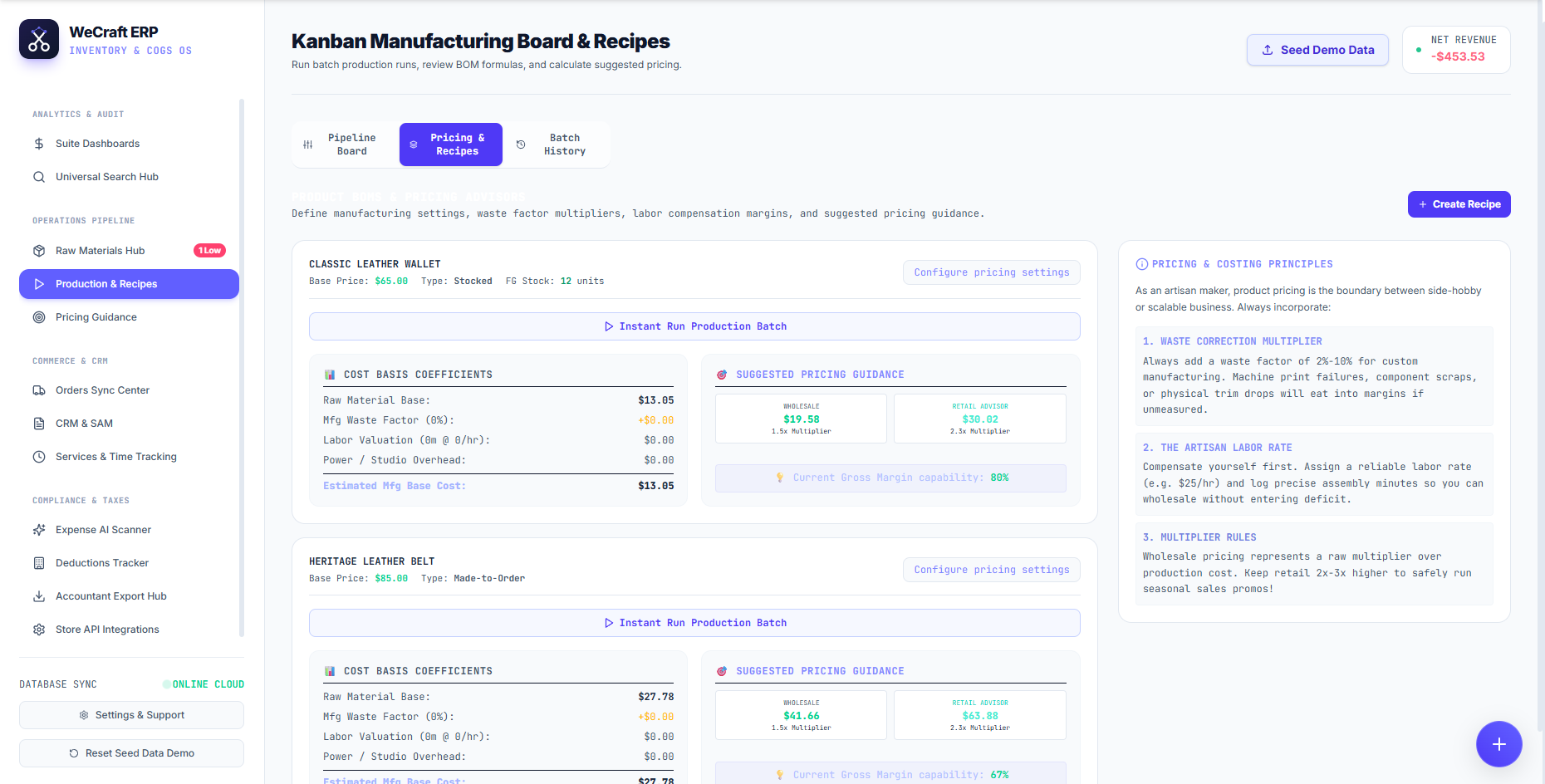
To manage your formulas, navigate to Production & Recipes in the left sidebar, and select the Pricing & Recipes tab at the top of the Kanban Manufacturing Board.
Here you will see a detailed economic card for every product in your catalog (e.g., Classic Leather Wallet, Heritage Leather Belt). You can click the blue + Create Recipe button to build a new one, or click Configure pricing settings on any existing card to edit it.
Cost Basis Coefficients
When you define a recipe, the system instantly evaluates the live inventory cost of your raw materials to generate the left panel:
- Raw Material Base: The exact mathematical sum of your components based on current supplier prices.
- Mfg Waste Factor (%): A critical safety margin. Adding a 2%-10% waste factor multiplier accounts for machine failures, component scraps, or physical trim drops.
- Labor Valuation: Compensate yourself! Assign a reliable labor rate (e.g., $25/hr) and log precise assembly minutes so you don't enter deficit pricing.
- Power / Studio Overhead: Allocate fixed utility costs per unit.
The sum of these coefficients yields your true Estimated Mfg Base Cost.
Suggested Pricing Guidance
Vercos ERP takes your true Base Cost and applies standard margin rules to generate the right panel:
- Wholesale Advisor: Recommends a raw multiplier over your production cost (typically 1.5x to 2x).
- Retail Advisor: Recommends a 2x-3x higher multiplier to allow for safe seasonal sales promos.
At the bottom of the guidance panel, you will see your Current Gross Margin capability percentage, validating if your current Base Price is financially sustainable.
Instant Production Runs
Once your BOM is perfected, you can click the Instant Run Production Batch button directly from the product card. This bypasses the visual Kanban board and immediately deducts the required raw materials from your warehouse while adding the finished goods to your available stock!