Tax season can be a massive headache for manufacturers. Because Vercos ERP tracks every gram of material and every cent of labor throughout the year, you don't need to manually calculate your write-offs.
Navigate to the Accountant Export Hub in the left sidebar to access your automated accounting and tax guidance.
The Tax & GAAP Center
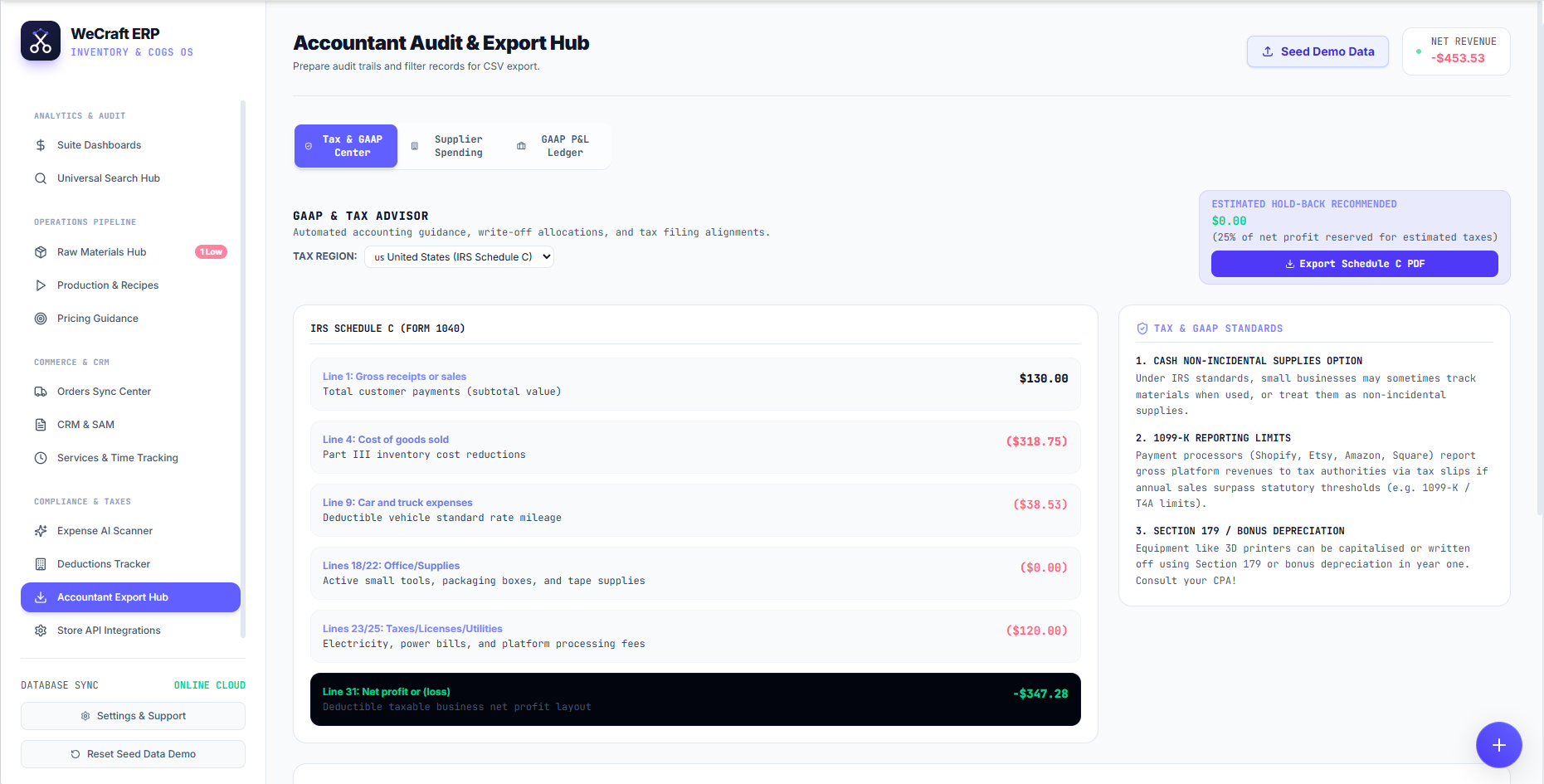
The primary tab in this hub acts as your virtual CPA. You can configure your specific Tax Region (e.g., US United States IRS Schedule C) and the system will automatically map your Vercos financial ledgers directly to the official government tax form lines!
For example, the system will automatically aggregate and map:
- Line 1: Gross receipts or sales
- Line 4: Cost of goods sold (Part III inventory cost reductions)
- Line 9: Car and truck expenses (from your Business Vehicle Logs)
- Lines 18/22 & 23/25: Office Supplies, Taxes, Licenses, and Utilities
At the bottom of the grid, Vercos provides your exact Line 31: Net Profit or (Loss).
Estimated Tax Hold-Backs
To ensure you never get caught off guard by a tax bill, the hub features an Estimated Hold-Back Recommended widget in the top right. It continuously calculates 25% of your Net Profit, advising you exactly how much cash you should be reserving in a separate bank account for quarterly estimated taxes.
When it's time to file, simply click the purple Export Schedule C PDF button to send a perfectly formatted document straight to your accountant.
Built-in Tax & GAAP Standards Guide
Vercos also provides an integrated knowledge base on the right side of the dashboard, educating you on complex manufacturing tax laws such as:
- Cash Non-Incidental Supplies Option: Treating materials as non-incidental supplies.
- 1099-K Reporting Limits: Understanding how Shopify or Etsy report gross revenues.
- Section 179 / Bonus Depreciation: How to write off your 3D printers and laser cutters in year one.