Raw materials are the building blocks of your manufacturing process. In Vercos ERP, the Inventories & Warehouses goes far beyond a simple list—it is a comprehensive warehouse tracking system designed to monitor physical component weights, assign racks, and handle restock orders automatically.
The Inventories & Warehouses
To access your primary inventory, click on Inventories & Warehouses in the left navigation sidebar .
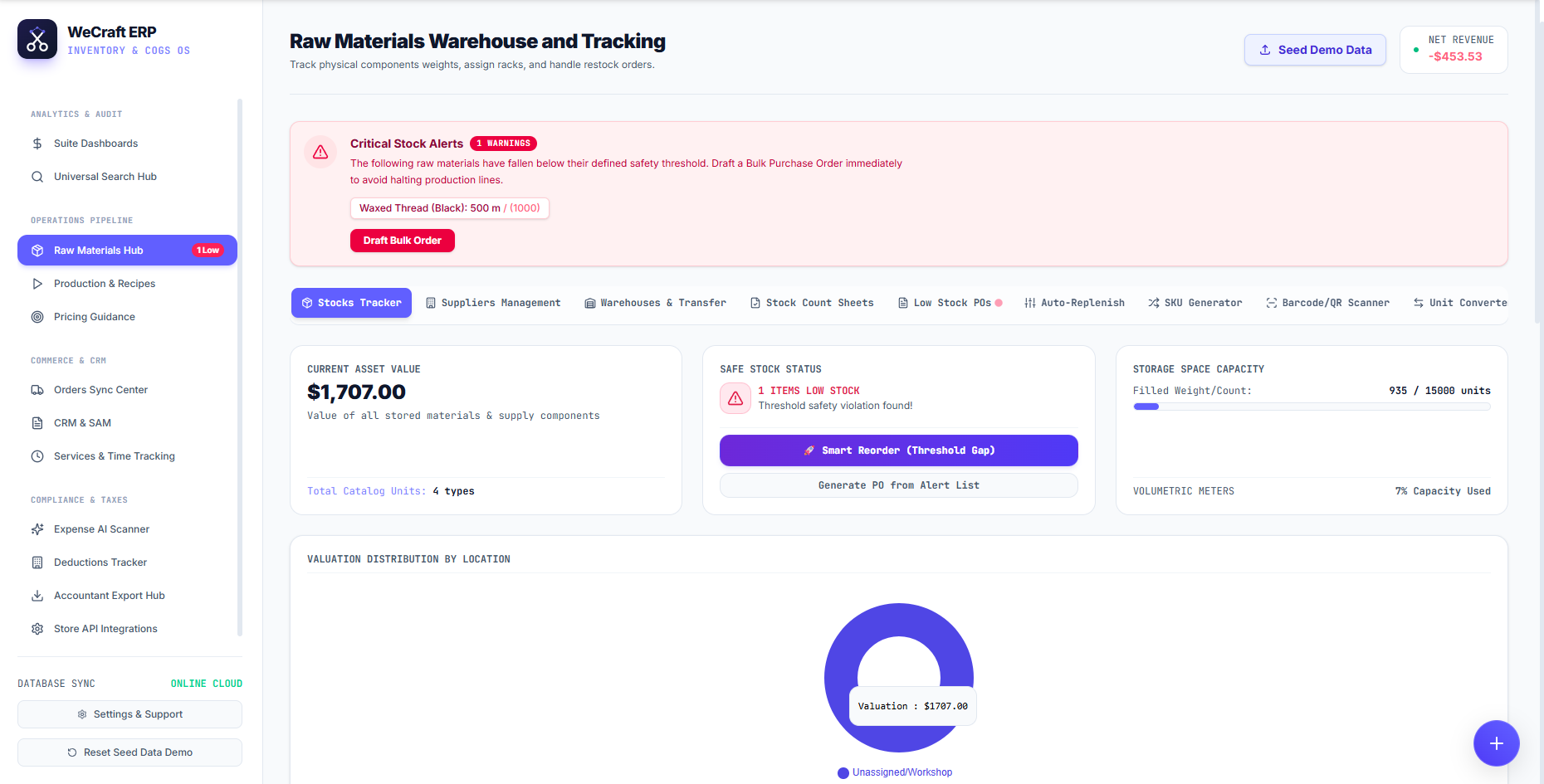
At the very top of this page, you will immediately see any Critical Stock Alerts. If a raw material falls below its safety threshold, a red warning box appears, allowing you to click Draft Bulk Order to instantly generate a purchase order before production halts.
The Central Tracking Dashboard
Below the alerts, you will find three vital summary blocks:
- Current Asset Value: The total monetary value of all stored materials across your catalog.
- Safe Stock Status: A quick health check of your inventory. If items are low, you can click Smart Reorder (Threshold Gap) to automatically calculate exactly how much of each material you need to buy to reach your safety levels.
- Storage Space Capacity: A visual progress bar showing your physical warehouse utilization (e.g., filled weight/count and volumetric meters used).
Specialized Inventory Tools
Vercos ERP offers a suite of advanced sub-navigation tabs within the Inventories & Warehouses to streamline operations:
- Stocks Tracker: Your main table for viewing and editing raw materials.
- Warehouses & Transfer: Move physical stock between different locations, racks, or bins.
- Stock Count Sheets: Print or view digital sheets for your end-of-month physical audits.
- SKU Generator & Barcode/QR Scanner: Automatically generate unique identifiers and scan them with a mobile device to rapidly check materials in or out.
- Auto-Replenish: Configure rules to automatically draft POs when stocks hit critical limits.
- Unit Converter: Seamlessly convert vendor purchasing units (e.g., 50lb bags) into your manufacturing usage units (e.g., ounces or grams).
Valuation by Location
At the bottom of the dashboard, the Valuation Distribution By Location doughnut chart gives you a real-time visual breakdown of where your capital is physically sitting (e.g., Workshop vs. Offsite Storage). Use the floating (+) button in the bottom right corner at any time to manually add a new raw material to your catalog.
Restocking and your Costing Method
Whenever stock is added to an existing material — through the Barcode/QR Scanner's Add Stock panel, a received Purchase Order, or a CSV import — Vercos asks for the cost per unit of that batch and applies it according to your workspace's Inventory Costing Method (set in Settings): under Weighted Average it blends into one running cost, while under FIFO/LIFO it's tracked as its own cost lot. Any material with more than one active lot shows a View Cost Lots breakdown in its row, listing each lot's remaining quantity, cost, and receive date, plus which one is up next.